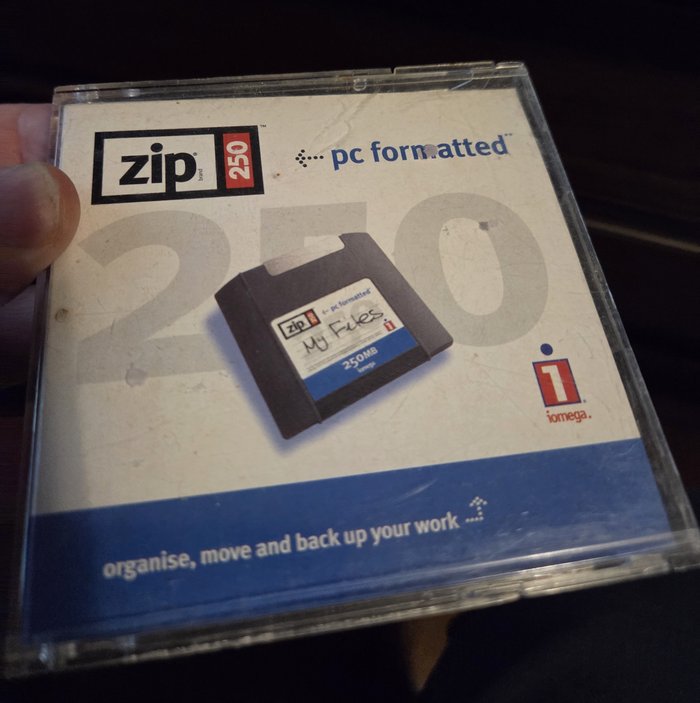
About 20 years after moving to Canada, my parents in Germany decided to clean up
their storage room in the basement in my old hometown in Germany. An ominous
box turned up that contained a working Hi8 camcorder with a stack of tapes and
a stack of ZIP disks. The camcorder was a nice surprise, still working, but
the ZIP disks were a blast from the past. Iomega’s 100 MB and 250 MB removable
magnetic disks were a popular backup medium in the 1990s. This was my favourite
volatile backup medium for a while (besides CDRs) right up until undergrad school.
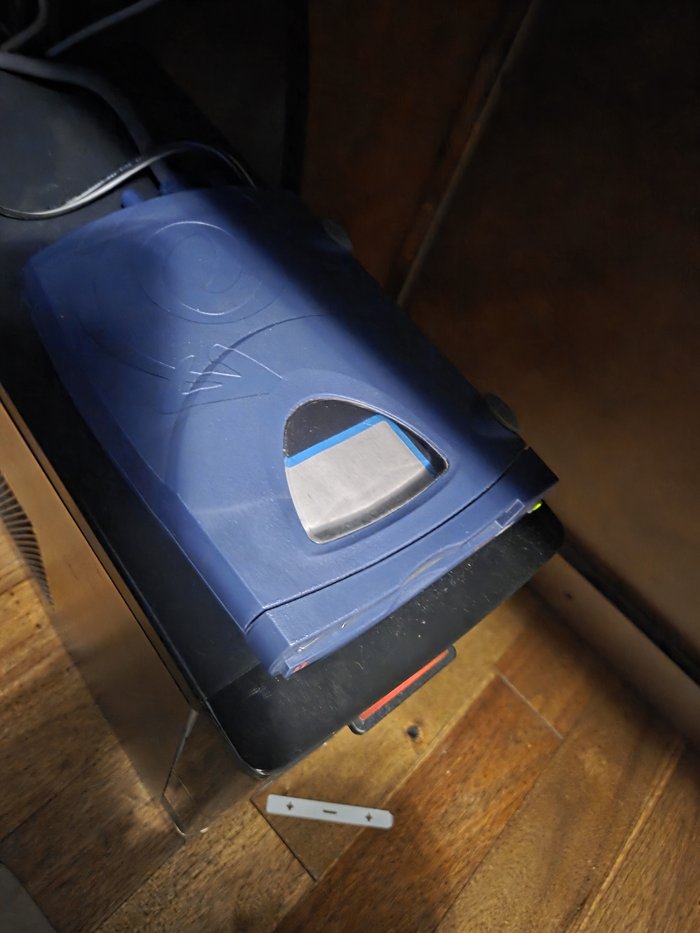
Unfortunately, the related drive was nowhere to be found. I remember I went through
several iterations from the original parallel-port model to an internal one and
finally a USB model, but the disks themselves were still around. A search on eBay
turned up a few hits, but it seems the USB ones sell at a premium and the internal
ones are unobtainium. I found a discounted external parallel-port one of questionable
quality and decided to give it a go.
Two Chips, Two Drivers
Not all parallel ZIP drives are the same underneath. Iomega shipped two generations
of the interface electronics, and Linux has a separate SCSI-over-parallel-port driver
for each:
ppa: the original chipset used in the first ZIP 100 parallel drives (1995).
Falls back to SPP/nibble mode if EPP isn’t available, which keeps it compatible
but painfully slow, well under 1 MB/s in the worst case.imm: the “Matchmaker” chipset used in later ZIP 100 units and in essentially
all ZIP 250 parallel drives. It needs EPP (or ECP) mode to perform reasonably, and
is the one you want if, like here, the drive is a 250.
Both are still present in mainline Linux as drivers/scsi/ppa.c and drivers/scsi/imm.c. They register with the kernel’s parport subsystem rather than
talking to the hardware directly, which is the detail that matters for everything
that follows: get parport working first, and the SCSI side is almost incidental.
What You Actually Need
The drive itself was never the hard part. The obstacles are all upstream of it:
- A parallel port. No 2020s consumer motherboard has one. The fix is a PCIe
multi-I/O card. Look for one built around a real chipset (MosChip MCS9900/9901,
Oxford OXPCIe952, WCH CH382/CH383) rather than an unbranded board with no
datasheet.
parport_pc ships with a PCI ID table for most of these, so once the
card is in a slot, Linux generally finds it without any manual configuration. - Not a USB-to-parallel dongle. This is the mistake that eats the most time.
Virtually every cheap USB-parallel cable on the market implements the USB Printer
Class (Centronics-only, effectively write-only), because that’s all a printer
needs. The
ppa/imm drivers need genuine bidirectional/EPP byte-mode access
through parport, which a USB Printer Class device does not expose. If the
adapter’s box just says “for printing,” it will not work here. Trust me, I bought one and wasted a week trying to make it work. - The drive’s own power supply. Parallel ZIP drives are not bus-powered (the
parallel port carries no power pins that matter here), so the original brick, or a
compatible replacement (they’re common 12V/1A-ish wall warts), is required.
- A DB25 parallel cable, ideally a proper IEEE 1284 bidirectional one rather
than an old unidirectional printer cable that only wires the pins a printer needs.
If the PCIe card has a jumper or BIOS/firmware option for the port mode, set it to EPP if that’s offered, ECP as a second choice. Plain SPP will still work with ppa, but noticeably slower, and imm wants EPP/ECP to begin with.
What worked for me almost out of the box was a Startech PEX1P2 parallel PCIe card.
My workstation is an older Intel i7-9700KF on an ASRock B360M Pro4 motherboard.
My recently upgraded NVIDIA 5060Ti 16GB took quite some space, so I made the mistake
of plugging it into the PCIe x16 slot that was meant for the second graphics card
to no avail. Only after moving it to the PCIe x1 slot did the card get detected.
Bringing the Port Up
With the card installed and the drive cabled and powered, the first checkpoint is
just confirming Linux sees the port at all, before SCSI enters the picture:
sudo modprobe parport
sudo modprobe parport_pc
ls /dev/parport*
dmesg | grep -i parport
A working PCIe card shows up in dmesg along these lines (the exact I/O base and
IRQ will differ):
parport0: PC-style at 0xde00, irq 19
If nothing shows up, check lspci for the card and confirm parport_pc actually
claimed it. Some very generic-chipset cards need parport_serial instead, since
that module handles a different family of combined serial+parallel PCI devices.
Loading the SCSI Bridge Driver
Once /dev/parport0 exists, load the driver that matches the drive generation, imm for this ZIP 250:
sudo modprobe imm
dmesg | tail -n 20
A working attach looks like:
imm: Version 2.05 (for Linux 2.4.0)
scsi0 : Iomega VPI2 (imm) interface
scsi 0:0:0:0: Direct-Access     IOMEGA   ZIP 250          J.03 PQ: 0 ANSI: 2
sd 0:0:0:0: [sda] Attached SCSI removable disk
If modprobe imm fails with Module imm not found, the running kernel’s module
set doesn’t include it. Ubuntu keeps some of the less common drivers, this being
a good example, out of the base linux-modules package, so pull in the extra set
first:
sudo apt install linux-modules-extra-$(uname -r)
If the drive was cold when the module loaded, or the disk wasn’t inserted yet, imm/ppa will just log a “Not Ready” a couple of times and back off. Reinserting
the disk and re-running modprobe -r imm && modprobe imm is faster than debugging
what looks like a failure but isn’t.
The /dev/sda4 Quirk
Once attached, lsblk or fdisk -l /dev/sda will very likely show the actual
usable filesystem sitting on partition 4, not partition 1:
Disk /dev/sda: 238.5 MiB
Device     Boot Start    End Sectors  Size Id Type
/dev/sda4        32 488392  488361  238.5M  6 FAT16
That’s not corruption. It’s just how Iomega’s own driver stack formatted these
disks back in the 90s, reserving the earlier partition slots for cross-platform
(Mac) compatibility and putting the DOS/Windows-visible FAT partition fourth. A
disk labeled “pc formatted,” like the one in the case above, follows this layout.
sudo mkdir -p /mnt/zip
sudo mount -t vfat /dev/sda4 /mnt/zip
ls /mnt/zip
Making the Backup Actually Count
Whatever “My Files” turns out to be, it’s coming off a 25-year-old removable
disk, so just copying files off with cp isn’t enough. A magnetic ZIP cartridge
that’s been sitting in a drawer for two decades is not a medium to trust twice.
A full raw image first, before touching anything else, means the recovery
attempt itself can’t make things worse:
sudo umount /mnt/zip
sudo dd if=/dev/sda of=zip250_backup.img bs=1M conv=noerror,sync status=progress
conv=noerror,sync tells dd to pad over any bad sectors instead of aborting, which
matters more here than it would for a healthy modern disk. With the image safely on
a modern drive, it can be mounted read-only for the actual file recovery, leaving
the original raw capture untouched:
sudo mount -o loop,ro,offset=$((32*512)) zip250_backup.img /mnt/zip
(The offset is partition 4’s start sector from the fdisk output above,
multiplied by the 512-byte sector size. Adjust to match what your own disk
reports.)
When It Doesn’t Attach
A few things to check, in rough order of how often they turn out to be the cause:
- Wrong driver for the chipset. If
imm attaches but every read times out,
or dmesg shows repeated imm: fifo failed type messages, try ppa instead.
Older 100 MB drives and a few early 250s used the original chipset. - Port stuck in SPP. If the card has a BIOS/jumper mode setting, and it’s on
SPP, both drivers still nominally work but can be unreliably slow enough to look
broken. Switch to EPP if available.
- IRQ sharing. Some cheap PCIe multi-I/O cards share a single IRQ across a
serial-and-parallel combo chip in a way
parport_pc doesn’t always negotiate
cleanly. Check /proc/interrupts for a parport line after loading the driver
to see whether it’s actually receiving interrupts at all. - A genuinely dead drive. These have belt- or gear-driven mechanisms and a
laser-assisted head-positioning system that hasn’t run in years. If the drive
never spins up (no motor noise at all when a disk is inserted), that’s a
hardware fault in the drive itself, not a Linux/parport problem.
With the image captured, whatever “My Files” actually contains is now safe on
modern storage, no matter what happens to the drive or the disk from here on out.
What Was Found
So it turns out that, of the 20 disks that were in the box, 2 were permanently damaged,
17 were readable and blank, and 1 disk contained a copy of my undergraduate thesis in
progress, which was already backed up elsewhere and has been archived in cloud storage
for ages. No salacious data, no lost code projects, no old game libraries.
I would have hoped to recover a few of those. Fond are the memories of sitting with the guys on
IRC during file-exchange sessions circa 1996-1999 after school while parents were at work.
I fear the little collection that was so laboriously downloaded over a 14.4k modem that may
have contained some pictures of Sawa Suzuki was lost to
time in machine upgrades from a 486 DX2-66 to a newer box at the end of the 90s.
Back in the day, you happened to have to know the little “weirdo” who ran the local
comic store to broaden your cultural horizons and put your lessons to use on IRC with the guys from
high school to get somewhere. Today there is Instagram and ubiquitous LTE broadband on mobile phones,
probably making my kids less safe. I think in terms of edgy content, we saw it as a form of art as
90s kids (Banmei Takahashi was a genius to some of us). Now Thai bar girls flood the feeds of
middle-aged men’s social media accounts with mass-produced cheap short-form content. They have replaced
what were once lengthy explorations into the voids of the young Internet to find the then Japanese
alpha female (… 30 year later happily married to one).
Back in the day before USB drives were common, this was an extremely useful backup medium.
I remember copying libraries of games, code projects and other data from friends’ computers
onto these disks. This eventually turned into external HDDs, USB flash drives and cloud storage over the years.
The ZIP drive with cables now rests in my home office’s retro interfacing box alongside
USB 3.5” floppy drives, USB IDE adapters, and a few other oddities that are still useful
to have around for the occasional retro-computing task.
Further reading:
Published: 2026-01-10
Updated : 2026-01-10
Not a spam bot? Want to leave comments or provide editorial guidance? Please click any
of the social links below and make an effort to connect. I promise I read all messages and
will respond at my choosing.